

Build A PostgreSQL Database
PostgreSQL is a free and open-source relational database management system (RDBMS) and is widely used as the primary database for many applications. In this article we will show you how to build a PostgreSQL database on a Linux machine.
Here are syntax notations we use to show the shell and psql commands:
$ psql -d postgres
postgres=# \q
$
The "$" sign is the Linux shell prompt. The PostgreSQL client program psql can be used to interact with database server and make queries. The "postgres=#" is the prompt of interactive mode. The "\q" command exits the interactive mode and brings us back to the Linux shell.
Let's start to build the database.
Initialize PostgreSQL Data Directory
Login to a user account that will be the owner of PostgreSQL database. From the PostgreSQL installation, a user account "postgres" may be created, but we can initialize database cluster in any account. For simplicity, we will choose an existing account, codespace, for our database cluster.
Choose or create a directory for PostgreSQL database. This is where the famous environment $PGDATA points to. The directory can be passed as an option (-D) or set as an environment. Let's set it as an environment and so we do not need to type it over and over again:
$ export PGDATA=~/database
$ initdb
After initialization, the contents in the directory look like
$ ls ~/database/
PG_VERSION  global        pg_dynshmem  pg_ident.conf  pg_multixact  pg_replslot  pg_snapshots  pg_stat_tmp  pg_tblspc    pg_wal   postgresql.auto.conf
base        pg_commit_ts  pg_hba.conf  pg_logical     pg_notify     pg_serial    pg_stat       pg_subtrans  pg_twophase  pg_xact  postgresql.conf
What we initialized is a new PostgreSQL database cluster. To bring up the PostgreSQL server from the directory, we can
$ pg_ctl startTo understand the files in the directory, let's get familiar with some PostgreSQL terminologies and its object hierarchies:
- database cluster: A collection of databases that is managed by a single instance of a running PostgreSQL server.
- database: An object within database cluster that stores schemas, roles, and other objects.
- schema: A namespace object within database, contains tables, indexes, views, sequences, functions, etc.
- table (index, view, sequence, function, ...): The primary structure that stores the data.
The object hierarchies form the logical structure of PostgreSQL database as shown below:
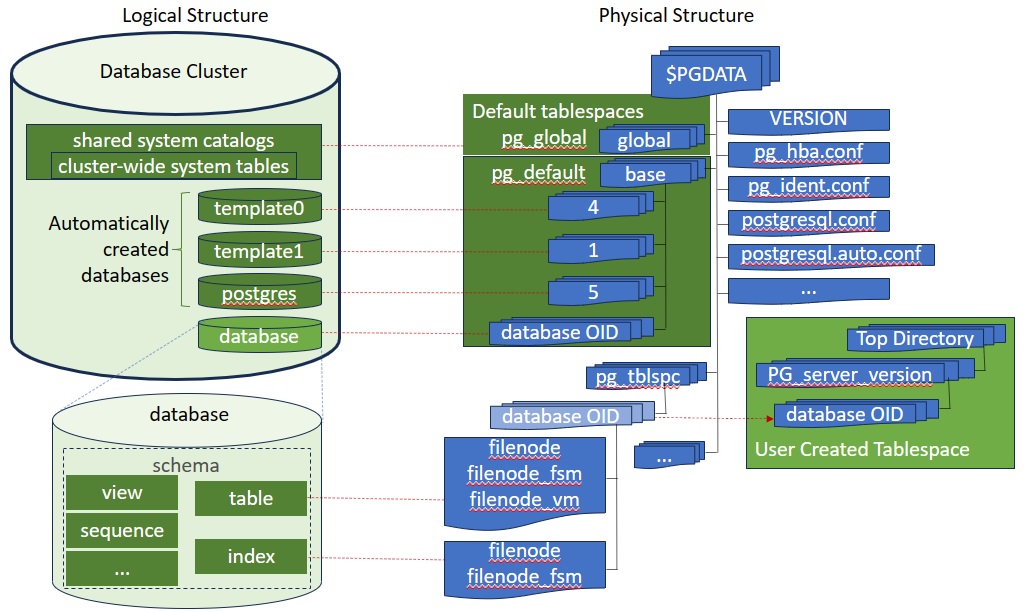
All objects in PostgreSQL are managed by their object identifiers (OIDs). The objects are stored in the tablespaces. The tablespace defines the location where PostgreSQL places the physical files of the database objects.
Two default tablespaces are automatically created by initdb: pg_global and pg_default. The pg_global is located at directory $PGDATA/global and the pg_default is at $PGDATA/base.
The pg_global tablespace is used for shared system catalogs. The pg_default tablespace is the default tablespace of the template1, template0 and postgres databases. Let's connect to the default postgres database and have a look of these two tablespaces:
$ psql -d postgres
postgres=# \db+
                                  List of tablespaces
    Name    |   Owner   | Location | Access privileges | Options |  Size  | Description
------------+-----------+----------+-------------------+---------+--------+-------------
 pg_default | codespace |          |                   |         | 22 MB  |
 pg_global  | codespace |          |                   |         | 565 kB |
(2 rows)

postgres=# select oid, spcname from pg_tablespace;
 oid  |  spcname
------+------------
 1663 | pg_default
 1664 | pg_global
(2 rows)
The two default tablespaces have OIDs 1663 and 1664, respectively. OIDs are 4 byte integers generated internally by the system. Let's also have a look of three default databases generated:
postgres=# \l
                                                     List of databases
   Name    |   Owner   | Encoding | Locale Provider | Collate |  Ctype  | ICU Locale | ICU Rules |    Access privileges
-----------+-----------+----------+-----------------+---------+---------+------------+-----------+-------------------------
 postgres  | codespace | UTF8     | libc            | C.UTF-8 | C.UTF-8 |            |           |
 template0 | codespace | UTF8     | libc            | C.UTF-8 | C.UTF-8 |            |           | =c/codespace           +
           |           |          |                 |         |         |            |           | codespace=CTc/codespace
 template1 | codespace | UTF8     | libc            | C.UTF-8 | C.UTF-8 |            |           | =c/codespace           +
           |           |          |                 |         |         |            |           | codespace=CTc/codespace
(3 rows)

postgres=# select oid, datname, dattablespace from pg_database;
 oid |  datname  | dattablespace
-----+-----------+---------------
   5 | postgres  |          1663
   1 | template1 |          1663
   4 | template0 |          1663
(3 rows)
Three default databases have OIDs 1, 4, and 5. They are used as subdirectory names under $PGDATA/base (location of tablespace pg_default) to store database files:
$ ls -l database/base/
total 12
drwx------ 2 codespace codespace 4096 Nov 21 03:18 1
drwx------ 2 codespace codespace 4096 Nov 21 03:12 4
drwx------ 2 codespace codespace 4096 Nov 21 03:19 5
The template0 is the standard system database and should never be changed after the database cluster has been initialized. It contains the standard objects predefined by PostgreSQL. The initial contents of template1 database is same as template0. You can add more objects to template1, and these objects will be copied into subsequently created user databases. Thus it is the "template" from which the new database is made. The postgres is the default database for users and applications to connect to. It is simply a copy of template1 initially and can be dropped and recreated if needed later.
Create Tablespace
By default, the default tablespace pg_default is used for all newly created objects. We can create new tablespaces for storing the user objects. To do so, choose a directory (or create it) and do
pregres=# create tablespace mytblspc location '/home/codespace/tablespace';
pregres=# \db+
                                           List of tablespaces
    Name    |  Owner   |          Location          | Access privileges | Options |  Size   | Description
------------+----------+----------------------------+-------------------+---------+---------+-------------
 mytblspc   | postgres | /home/codespace/tablespace |                   |         | 0 bytes |
 pg_default | postgres |                            |                   |         | 22 MB   |
 pg_global  | postgres |                            |                   |         | 565 kB  |
(3 rows)

postgres=# select oid, spcname from pg_tablespace;
  oid  |  spcname
-------+------------
  1663 | pg_default
  1664 | pg_global
 16388 | mytblspc
(3 rows)
Now we have a new tablespace of 0 size and OID 16388. PostgreSQL creates a symlink in $PGDATA/pg_tblspc to its location:
$ ls -l ~/database/pg_tblspc/
total 0
lrwxrwxrwx 1 codespace codespace 26 Nov 22 15:48 16388 -> /home/codespace/tablespace
ls -l ~/tablespace/
total 4
drwx------ 2 codespace codespace 4096 Nov 22 15:48 PG_16_202307071
Inside the tablespace directory, a PG_server_version directory has been created and all objects created in this tablespace will be put into this directory.
Create Database
By default, all objects are created in default tablespace pg_default unless specified by tablespace clause in create statement. Let's create a database in the newly created tablespace:
postgres=# create database mydb tablespace mytblspc;
postgres=# select oid, datname, dattablespace from pg_database;
  oid  |  datname  | dattablespace
-------+-----------+---------------
     5 | postgres  |          1663
 16389 | mydb      |         16388
     1 | template1 |          1663
     4 | template0 |          1663
(4 rows)
A new database is created with OID 16389 in tablespace mytblspc (OID 16388):
$ ls -l ~/database/pg_tblspc/16388/PG_16_202307071/
total 4
drwx------ 2 codespace codespace 4096 Nov 22 16:06 16389
If we are not going to use the default postgres database, we can swich to the new database and drop postgres database:
postgres=# \c mydb
mydb=# drop database postgres;

mydb=# \l
                                                     List of databases
   Name    |   Owner   | Encoding | Locale Provider | Collate |  Ctype  | ICU Locale | ICU Rules |    Access privileges
-----------+-----------+----------+-----------------+---------+---------+------------+-----------+-------------------------
 mydb      | codespace | UTF8     | libc            | C.UTF-8 | C.UTF-8 |            |           |
 template0 | codespace | UTF8     | libc            | C.UTF-8 | C.UTF-8 |            |           | =c/codespace           +
           |           |          |                 |         |         |            |           | codespace=CTc/codespace
 template1 | codespace | UTF8     | libc            | C.UTF-8 | C.UTF-8 |            |           | =c/codespace           +
           |           |          |                 |         |         |            |           | codespace=CTc/codespace
(3 rows)
Notice that the prompt has been changed to "mydb=#" and remember next time you should use mydb to connect to the database server:
$ psql -d mydb